Before hosting with WPX, I tried a handful of web hosts including Bluehost, WP Engine and the hosting included with Wealthy Affiliate.
Some were cheap, some were hyped, but none gave me what I really wanted – fast, reliable websites that I didn’t have to babysit.
In May 2021, I moved all my sites to WPX Hosting. Moving from the web host that I previously used, meant I had to pay more.
And here’s the truth: I’m not a technical guy. I don’t care about all the server talk (CDNs, SSDs, PHP versions – if that makes your head spin too, you’re in the right place).
What I do care most about are a few things:
- My websites load fast.
- Support answers me in under 30 seconds – every time.
- I don’t have to worry about backups, SSL, or malware. WPX handles it.
This review isn’t going to dive into complicated charts or geeky specs. Instead, I’ll share my real experience after 4+ years as a satisfied customer of WPX Hosting. You’ll get the good, the not-so-good, and whether I think it’s worth your money in 2026.
This post may contain affiliate links. ThriversHub earns commissions at no extra cost to you when purchases are made through links on this page. For more info, visit the disclosure page.
Table of Contents
Why I Switched to WPX Hosting
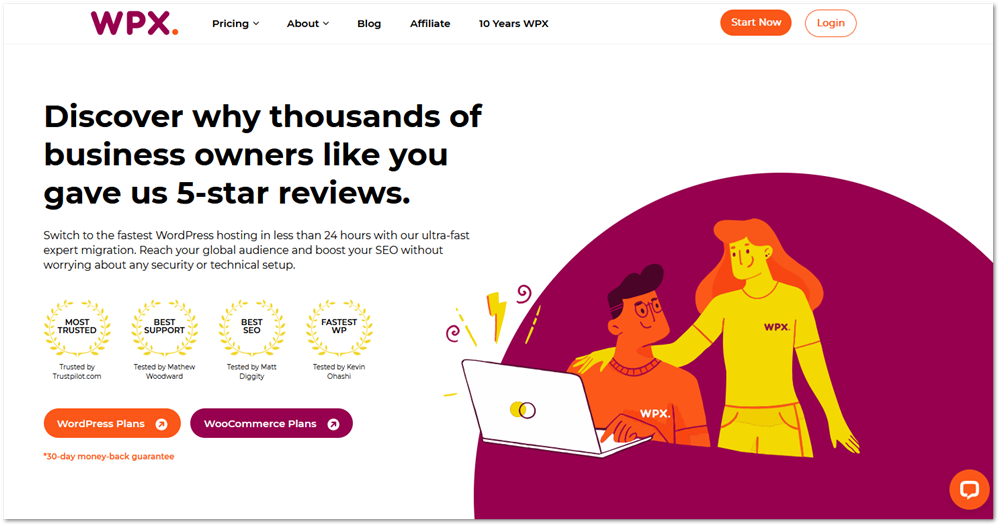
I decided to go with WPX Hosting after seeing how they performed in independent tests by notable bloggers like Matthew Woodward and Matt Diggity.
Back in 2021, everyone was obsessed with getting their websites to perform better so they could rank better in Google. Website loading speed was a huge factor then, so everyone and their grandmother were trying to make their sites load fast.
Slow sites aren’t just annoying for visitors. They also hurt Google Pagespeed scores, which means lower rankings and less traffic. As an affiliate marketer, that’s the last thing I want.
My websites weren’t performing well and the Pagespeed scores didn’t look too great either. I thought to myself – it must be the hosting.
I tried moving to WP Engine (which is a good WordPress host), but there were some technical difficulties in moving my website so I decided to cut them loose and tried WPX the same day.
And honestly? It’s one of the best decisions I’ve made for my online business.
- It was fast – my scores improved.
- Customer service was fast – they always answered in under 30 seconds
- I spend minimal time inside my hosting dashboard
This is why I recommend WPX Hosting to other bloggers who are ready to level up. Ready to speed up your site too? Get started with WPX Hosting here.
What Makes WPX Different (In Plain English)
Hosting companies (and sometimes their geeky affiliates), love throwing around technical terms. SSD servers, PHP versions, CDN integrations… honestly, most of that goes over my head. If you’re like me, you don’t care about those details – you just want your site to load fast and stay online.
That’s where WPX really shines. Let me break it down in plain English:
Speed That Actually Matters
When I moved my sites to WPX, my Google Pagespeed scores jumped almost immediately. That’s huge because site speed isn’t just about bragging rights, it affects your rankings, your traffic, and how long people stick around on your site.
The speed comes from a combination of WPX infrastructure and performance plugins installed on my websites.
Without getting too much into the techie stuff:
- WPX has SSD-based hosting on high-performance servers
- They have their own custom-build CDN so your pages are served from a location nearest to the user.
- You install the W3 Total Cache plugin from WordPress on your site and download WPX’s optimized settings to configure your website.
This is how your websites will be able to load fast and rank better as a result.
Support That Doesn’t Waste Your Time
Every time I’ve ever needed help, I’ve gotten a live human response in under 30 seconds. Not some AI bot, not a copy-paste answer – an actual person who fixes the problem right away. It feels less like a corporate help desk and more like a small team that actually cares.
Super Simple to Use

The WPX dashboard (which they recently redesigned) is clean and beginner-friendly. I don’t get lost hunting for settings. Adding a new site, checking backups, or setting up email is straightforward, even if you’re not technical.
See how it compares to cPanel, the dashboard you might be using.
Free Stuff That You Can Use
Some hosts make you pay extra for basics like SSL certificates or backups. WPX includes them free:
- Free SSL (secure padlock for your site).
- Free daily backups.
- Free malware cleanup if your site ever gets hacked.
- Free CDN for faster global loading.
- Free email (on Business plan and above).
These aren’t fancy “extras” – they’re essentials, and I love that I don’t have to think about them.
No Sneaky Upsells
With some hosts, you sign up cheap but get hit with upsells at every step. WPX feels refreshingly transparent. The price you see is the price you pay.
This is why I stayed with WPX. I don’t need to know all the tech behind it. I just need my sites to be fast, secure, and supported.
If you want hosting that keeps things simple while giving you speed and support, see WPX plans here.
My Personal Experience with WPX Hosting
I’ve been with WPX since May 2021, and to be honest, I’ve never worried about hosting again. It just stopped being a stress point in my business.
The WP Engine Detour
Funny story – the same day I signed up for WPX, I also tried WP Engine.
After reading the pricing page, the feature pages and more, I decided to go for it. It meant I could only transfer I website for about $30 but I figured I’d move my most important website and see how it goes.
Right away, I ran into technical issues migrating my site to WP Engine. Their support couldn’t fix it. I didn’t know what it was then but I later found out that it was my fault for leaving active a WordPress plugin that was banned on their servers.
On top of that, the price was higher than I was comfortable with. In hindsight, I’m glad it didn’t work out, because I would’ve been paying more for less. That’s when I cut WP Engine loose and went ahead with WPX.
Support That’s Actually Support
One of the biggest things that’s kept me loyal to WPX is their support. Each time I’ve reached out, I’ve gotten an answer in under 30 seconds. Not once, not twice – – literally every single time.
And it’s not just “here’s a link to our FAQ.” They always make sure to fix the issue. For someone like me who doesn’t enjoy messing around with hosting settings, that is priceless.
Real Speed Gains
Before WPX, my Google Pagespeed scores were dragging my sites down. After the move, I saw noticeable improvements without having to install a dozen plugins. That boost helped with rankings and just made my sites feel more professional.
No More Hosting Stress
You know what’s the best part though?
Nowadays, I don’t even think about hosting anymore. I know my sites are fast, secure, backed up daily, and supported by a team that actually answers when I need them. It feels like having a safety net I didn’t know I was missing.
This is why I recommend WPX Hosting to beginner bloggers and affiliates. You can start with the Starter plan if you’re just beginning.
Try WPX Hosting risk-free for 30 days.
WPX Hosting Plans & Pricing
Let’s talk about pricing and what you get when you choose WPX to host your website.
WPX has four plans for WordPress hosting:
- Starter
- Business
- Professional
- Elite
Each one is designed for a different stage of growth, so there’s a natural upgrade path as your sites and traffic increase.
All plans come with free SSL, daily backups, malware cleanup, CDN, and 24/7 support. The difference between plans is really about how many sites you can host and how much storage and bandwidth you get.
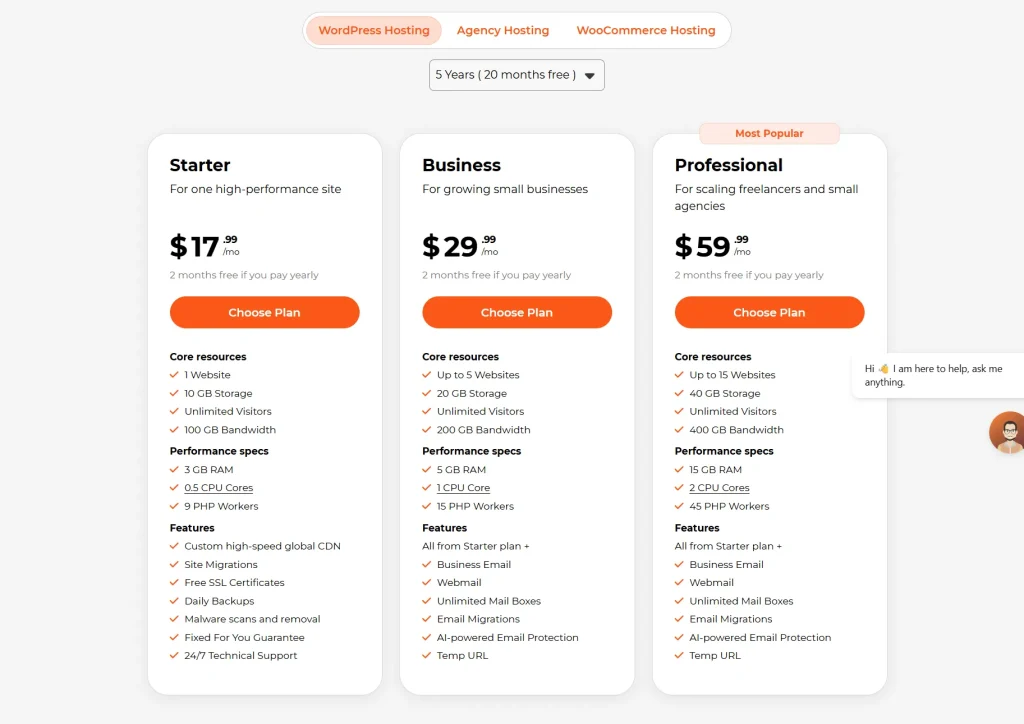
There are monthly and annual billing options. If you pay annually, you get 2 months free. You can also prepay for longer terms, up to 5 years, and the longer you commit, the lower the monthly rate gets.
Starter Plan
Price: $17.99/month ($14.99/month when billed annually, as low as $11.99/month on a 5-year term)
This is where I’d tell most beginners to start. If you’re building your first affiliate marketing website or blog, the Starter Plan gives you everything you need without paying for resources you won’t use yet.
It covers:
- one website installation
- 10GB of SSD storage
- 100GB of bandwidth
- A free SSL certificate
- Daily backups
- Malware cleanup
- WPX’s custom CDN
The only thing it doesn’t include that the higher plans do is the business email feature, but that’s not something most beginners need right away.
At $17.99/month, it’s a fair price for what you’re getting. And when your site grows and you’re ready to add more websites, upgrading to the Business Plan is straightforward.
Business Plan
Price: $29.99/month ($24.99/month when billed annually)
This is the plan I’m currently using. I have four websites running on it, with one slot left. It’s the right move once you’re managing more than one site or you know from the start that you’re building out a small portfolio.
- Includes 5 website installations
- 20GB SSD storage
- 200GB bandwidth
- Free SSL certificates for all your websites
- Unlimited email accounts
- Free site migrations from your previous host
It also adds business email, which the Starter Plan doesn’t include.
The Business Plan hits the sweet spot for affiliate marketers who are past the “just getting started” phase and are actively growing. I’ve been on it since 2021 and haven’t had a reason to upgrade.
Professional Plan
Price: Price: $59.99/month ($49.99/month when billed annually)
The Professional Plan makes sense when you’ve outgrown the Business Plan, either because you need more than 5 website slots or your traffic has grown to the point where you need more resources.
On this plan, you get:
- Up to 15 website installations
- 40GB SSD storage
- 400GB bandwidth
- All features from the Business plan included
- Priority customer support
Elite Plan
Price: Price: $119.99/month ($99.99/month when billed annually)
The Elite plan is mainly for more advanced marketers with a lot of sites that have high traffic. When you’ve outgrown the Professional plan with either site or traffic allowance, you’ll need this plan.
- Accommodates up to 35 website installations
- 80GB SSD storage
- Unlimited bandwidth
- Highest tier of support response
- Maximum allocation of resources per site
The Elite plan provides the most value given its premium price point. The unlimited bandwidth becomes particularly important for sites experiencing viral content success or seasonal traffic surges.
Is The Pricing Worth It?
A few things worth knowing about WPX’s pricing:
- All plans include free SSL, backups, malware cleanup, CDN, and email (Business and above).
- You get the same level of support no matter which plan you’re on.
- There’s a 30-day money-back guarantee, so you can try it risk-free.
- If you pay yearly or even longer, you can get free months or up to a year.
Yes, WPX costs more than entry-level hosts like Bluehost or the hosting included with Wealthy Affiliate. But those options often require extra plugins, paid upgrades, or developer help to get the same speed and security that WPX includes out of the box.
If you’re just starting out, the Starter Plan is more than enough for one site. When you’re ready to grow beyond that, the upgrade path is simple.
Pros & Cons of WPX Hosting
No hosting company is perfect, but after 4+ years with WPX, I’ve seen far more positives than negatives. In fact, there hasn’t been a lot of negatives – I heard about one outage after it happened but I couldn’t tell you that I experienced any downtime at all.
So here’s how the pros and cons stack up:
Advantages
Limitations
For me, the pros heavily outweigh the cons. The peace of mind I get from knowing my sites are fast, secure, and supported is worth the monthly price.
If you’d rather not stress about downtime or backups, switch to WPX Hosting today.
WPX Compared To Other Hosts
I didn’t land on WPX by accident. Like a lot of bloggers, I tried a few different hosts before finding the one that clicked. Here’s how WPX stacks up against the ones I used.
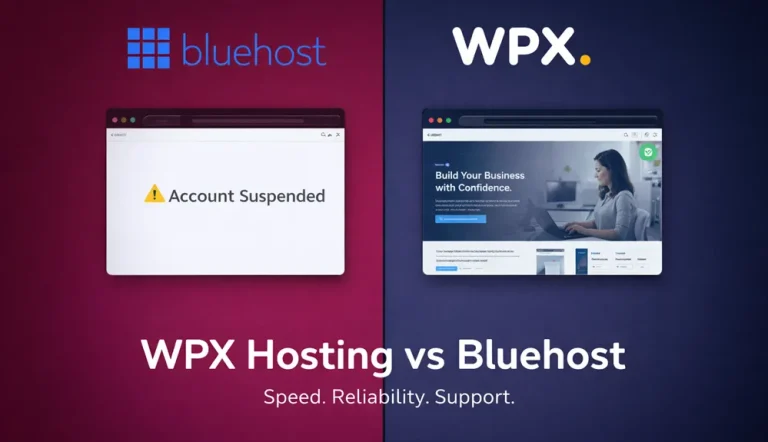
WPX vs. Bluehost
Bluehost was the very first host that I used when I was just starting out as an affiliate marketer.
It’s also one of the most popular beginner hosts because it’s cheap and it gets recommended everywhere. It’s been a while since I used them but I still hear the same complaints.
The reason I moved my websites from Bluehost is because I was getting a lot of engagement on my website and they incorrectly identified the activity as spam. Because I wasn’t a technical person, they led me to accidentally delete all the comments I had gotten on my blog posts which really pissed me off.
Besides that:
- Support was slow
- My websites had outgrown it’s current plan (and nobody said anything).
- And there were constant upsells (you sign up cheap, but then need to pay extra for backups, SSL, or speed tools).
If your only goal is to get online for the lowest cost, Bluehost works. But if you actually want a fast, stable site that helps you grow, WPX is worth the upgrade.
WPX vs. WP Engine
The same day I signed up for WPX, I also tried WP Engine. On paper, it looked solid.
But when I ran into migration issues, their support couldn’t fix it. That was my red flag. I later found out that I had a “banned plugin” installed while migrating so it was basically my fault that I ran into issues. Or was it their fault for having a “banned” list of plugins?
Plus, WP Engine comes at a higher cost. In hindsight, I would’ve been paying more to host one website when I could have been hosting five.
WPX won me over because their team handled the migration with ease and they kept things simple.
WPX vs. Wealthy Affiliate Hosting
I hosted my websites for free with Wealthy Affiliate because the hosting was bundled into my membership cost.
It worked fine but I was concerned about performance. Pagespeed Insights pointed out that my websites weren’t loading as fast as I would like. That translated into weaker rankings and less traffic. That’s a deal-breaker for any affiliate marketer.
When I moved to WPX, my speed scores jumped right away. I didn’t have to do any technical tinkering or pay a developer. Just faster sites.
The Bottom Line
Bluehost is cheaper.
WP Engine is pricier and more corporate.
Wealthy Affiliate Hosting is convenient but slow by industry standards.
WPX Hosting hits the sweet spot. It’s fast, beginner-friendly, and has the best support I’ve experienced.
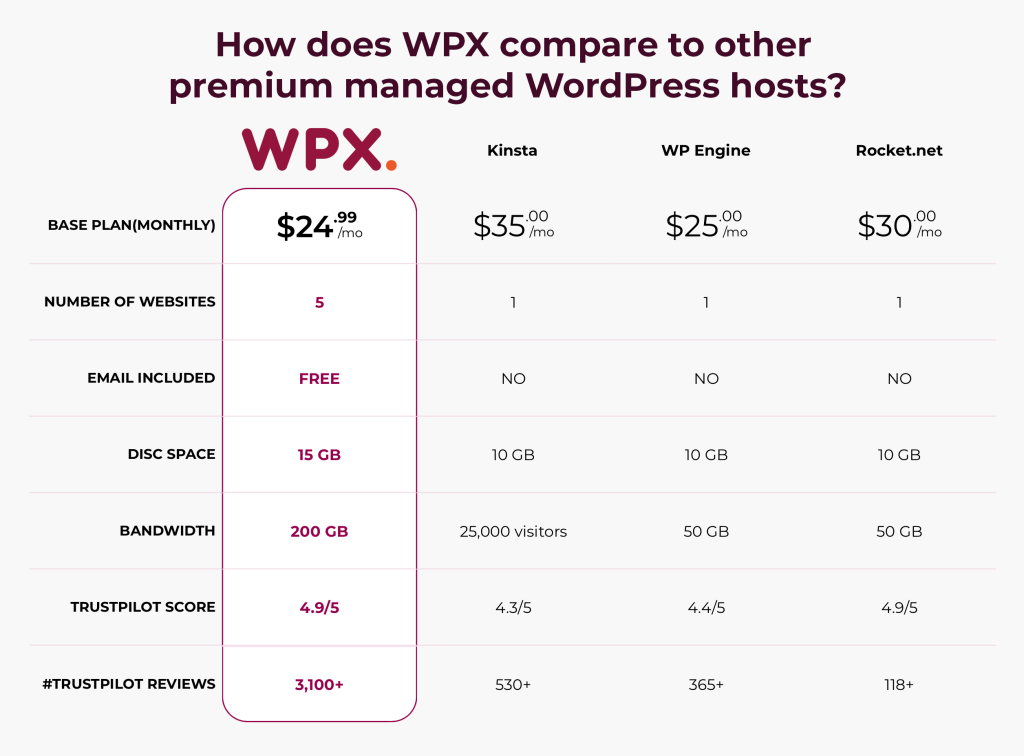
How Does It Compare to Alternatives?
When it comes to WPX’s real competition, here’s a little breakdown of how hosts like Kinsta, WP Engine and Rocket.net compare.
I didn’t have to do any testing – these are just based on the known facts like pricing, features and allowances.
If you’re serious about blogging or affiliate marketing, WPX is the hosting I recommend every time. You can check them out here.
Who Should Choose WPX Hosting?
WPX isn’t for everyone, and that’s okay. But if you’re in one of these groups, you’ll get the most value from it:
- Beginner bloggers and affiliates – If you’re building your first site and don’t want to deal with technical stuff, start with the Starter Plan. It’s one site, straightforward pricing, and everything you need to get up and running fast.
- Online business owners – Running a store, membership site, or portfolio? Fast loading times keep your visitors engaged and buying.
- Content creators with multiple sites – WPX makes it easy to manage several websites from one dashboard, without the hassle.
- Anyone frustrated with slow hosting – If you’re tired of support tickets that take days to answer or sites that crawl when traffic spikes, WPX is a breath of fresh air.
Who it’s not for:
- Someone who wants to host on a platform other than WordPress. WPX is built exclusively for WordPress hosting.
- Someone who needs to host more than one site but doesn’t want to upgrade beyond the Starter Plan. If you’re planning a multi-site portfolio from the start, go straight to the Business Plan.
For me, as an affiliate marketer who doesn’t want to mess with servers or code, WPX has been the perfect fit. I can focus on creating content and growing my business while knowing my sites are taken care of.
If that sounds like you too, you can try WPX Hosting risk-free for 30 days.
How to Get Started With WPX Hosting
One of the best things about WPX is how easy it is to get started. You don’t need to be “techy” to set everything up. The exact process varies slightly depending on if you’re starting from scratch or migrating an active website from another host.
Here’s how to get started.
1. Pick Your Plan
If you’re just starting out, go with the Starter Plan. It’s $17.99/month and covers everything you need for one website – free SSL, daily backups, malware cleanup, and WPX’s custom CDN. You can always upgrade to the Business Plan later when you’re ready to add more sites.
If you already know you’re building multiple websites, skip straight to the Business Plan which covers up to 5 sites at $29.99/month.
You’ll also need to decide if you want to pay monthly or lock in a lower rate by paying annually or longer. The longer the term, the lower the monthly price gets.
2. Use the Free Migration Service
Already have a site somewhere else? WPX will move it for free.
I didn’t have to lift a finger when moving my sites. Their migration team handled everything smoothly, which was a huge relief compared to my failed WP Engine experience.
Once you’ve created a WPX Hosting account, you can log in and use the migration form to get started on moving your websites.
3. Install WordPress in One Click
Once your account is set up, installing WordPress literally takes one click. No scary tech steps. In minutes, you’ll have your site live and ready to customize.
4. Add Your Free SSL & Email
With other hosts, you often have to pay extra for SSL. WPX includes it free across all plans. If you’re on the Business Plan or above, you also get free business email that you can set up to match your domain name.
5. Relax and Grow Your Site
The best part about WPX is that once you’re set up, you don’t have to think about hosting again. Daily backups, malware cleanup, support in under 30 seconds – it’s all handled. You can finally focus on building your content and business instead of troubleshooting tech.
Conclusion
I’ve been using WPX Hosting since May 2021, and I can honestly say it’s the best hosting decision I’ve made.
After trying Bluehost, Wealthy Affiliate Hosting, and even WP Engine, nothing came close to the mix of speed, simplicity, and support I’ve gotten with WPX.
The biggest difference? Peace of mind.
- My sites load fast.
- I don’t worry about downtime or security.
- And whenever I need help, support is there in under 30 seconds.
At the end of the day, I’m not a technical person. I don’t care about servers or fancy specs. I just need hosting that works so I can focus on content and growing my business. WPX gives me exactly that.
You don’t need to stress about hosting anymore. With WPX, your sites will be fast, secure, and backed by a real support team that actually answers when you need them.
If you want the same peace of mind I’ve had since 2021, sign up for WPX Hosting today.